If you want the best picture and bright colors, pick an oled display. Gamers and movie fans like oled because it shows dark blacks and clear pictures. If you want to save money or need a screen for outside, lcd is a better pick. Many phones, TVs, and gaming devices use oled since people enjoy bright colors and sharp images.
You will see oled in most new phones and fancy TVs, but lcd is still common for laptops and monitors.
|
Common Uses |
|---|
|
Smartphones |
|
Televisions |
|
Gaming devices |
|
Laptops |
|
PC Monitors |
|
Smartwatches |
|
Digital Signage |
Key Takeaways
-
Pick OLED if you want the best picture. It shows very dark blacks and bright colors. This makes it great for watching movies and playing games.
-
Pick LCD if you want to save money. LCD screens cost less and work well in bright places.
-
Think about how long each screen lasts. LCDs usually last longer than OLEDs. LCDs also have less chance of burn-in.
-
Think about how you will use your screen. OLED is good for art because it shows colors well. LCD is better for everyday use and seeing outside.
-
Ask yourself some important questions before you buy. Think about your budget, how you will use the screen, and if picture quality matters to you.
OLED vs LCD Overview
What Is an OLED Display?
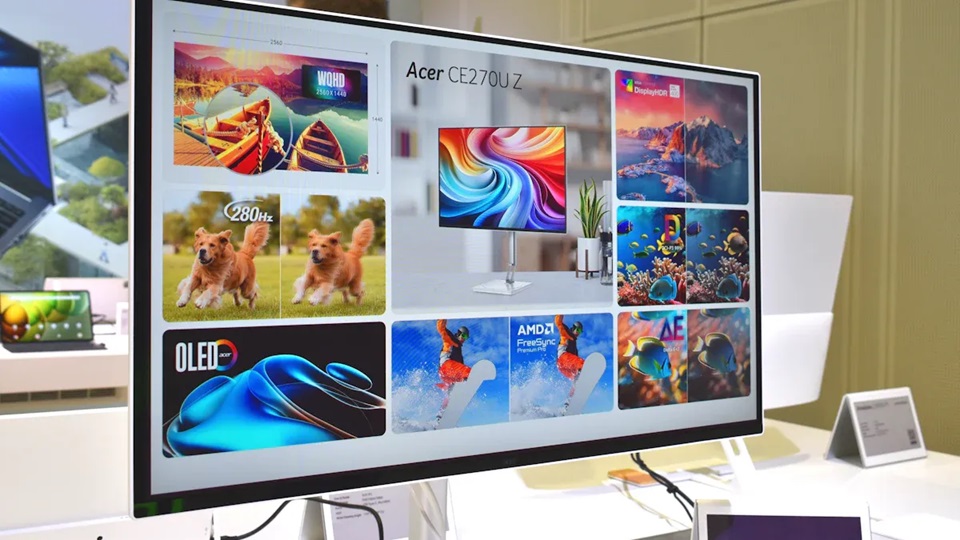
You see an oled display in many modern devices. This type of screen uses organic materials that light up when electricity passes through them. Each pixel creates its own light, so you get deep blacks and vibrant colors. Because every pixel works on its own, oled displays show sharp images and high contrast. These screens are thin and flexible, making them popular in smartphones and high-end TVs.
What Is an LCD Display?
An lcd display works differently. It uses a backlight to shine through layers of liquid crystals. The crystals twist and block light to form images. Since the backlight always stays on, lcd displays cannot show true black. However, lcd displays can get very bright, which helps you see the screen outside or in sunlight. You find lcd displays in many laptops, monitors, and budget TVs.
How Do They Differ?
When you compare oled vs lcd, you notice some big differences. Oled displays control each pixel, so you get better picture quality and more vibrant colors. Lcd displays use a backlight, so they often look less sharp and have lower contrast. Oled displays are thinner and use less power because they do not need a backlight. Lcd displays last longer and cost less, but they may not look as good from the side.
Here is a quick comparison:
|
Feature |
OLED Display |
LCD Display |
|---|---|---|
|
Light Source |
Each pixel emits its own light |
Needs a backlight |
|
Picture Quality |
Deep blacks, vibrant colors |
Bright, but less accurate colors |
|
Thickness |
Thinner and more flexible |
Thicker and less flexible |
|
Viewing Angle |
Wide, colors stay true |
Narrower, colors may shift |
|
Power Use |
Lower, no backlight needed |
Higher, always-on backlight |
|
Cost |
More expensive |
More affordable |
Tip: If you want the best picture quality and vibrant colors, oled displays are a great choice. If you need a screen that is bright and budget-friendly, lcd displays work well.
Picture Quality and Contrast Ratio
OLED Display: Deep Blacks and Vibrant Colors
When you look at an oled display, you notice deep blacks and vibrant colors right away. Each pixel in oled displays can turn off completely. This means you see true blacks, not just dark grays. Movie scenes with shadows or night skies look more realistic. You get superior contrast because the bright parts of the screen stand out against the dark areas.
Oled displays also show a wide range of colors. Some models, like QD-OLED, cover up to 116% of the DCI-P3 color space. This means you see more shades and richer tones. The table below shows how different oled technologies perform:
|
Technology |
DCI-P3 Coverage |
Peak White Luminance (nits) |
|---|---|---|
|
WOLED |
67% |
1300 |
|
QD-OLED |
116% |
1000 |
You get excellent color accuracy with oled displays. For example, LG OLED TVs score an average color error of just 1.8 JNCD (Just Noticeable Color Difference), which means colors look very close to real life. This level of accuracy helps you enjoy movies, games, and photos as the creators intended.
Tip: If you want the best picture quality for movies or creative work, oled displays give you true blacks and superior contrast.
LCD Display: Brightness and Sunlight Visibility
LCD screens use a backlight, so they cannot turn off individual pixels. You do not get true blacks, but you do get high brightness. This makes lcd screens easier to see in bright rooms or outside in sunlight. If you use your device outdoors often, lcd can help you see the screen clearly.
LCD displays usually have a contrast ratio between 1000:1 and 3000:1. This means the brightest white is 1000 to 3000 times brighter than the darkest black the screen can show. While this is good, it does not match the infinite contrast ratios of oled. Still, lcd screens work well for office use, classrooms, or anywhere you need a bright display.
The table below shows how lcd and oled compare in color accuracy:
|
Metric |
LG OLED TV |
Samsung LCD TV |
|---|---|---|
|
Average Color Error (JNCD) |
1.8 |
N/A |
|
Color Accuracy |
Excellent |
Good |
|
Performance in Tests |
Best |
N/A |
Contrast Ratio: OLED vs LCD
Contrast ratio tells you how well a screen shows the difference between the darkest and brightest parts. Oled displays have infinite contrast ratios because they can show true blacks. You see this when watching movies with dark scenes. The black parts look deep and pure, while the bright parts pop out. This gives you superior contrast and a more lifelike image.
LCD screens have a static contrast ratio, usually between 1000:1 and 3000:1. Even at high brightness, lcd cannot match the superior contrast of oled. Some lcd screens use tricks like dynamic contrast, but they still cannot reach the true blacks of oled displays.
Here is a quick comparison:
|
Display Type |
Typical Contrast Ratio |
|---|---|
|
OLED |
Infinite (true blacks) |
|
LCD |
1000:1 to 3000:1 (static) |
You will notice the difference most when watching movies or playing games with lots of dark and light areas. Oled gives you superior contrast and true blacks every time. If you want the best possible picture quality, oled is the clear winner.
Note: Oled displays stand out for their infinite contrast ratios and true blacks, while lcd screens offer good brightness and visibility in sunlight.
Performance and Lifespan
Response Time and Refresh Rate
If you play games or watch fast videos, you want a quick display. OLED displays change colors very fast. Each pixel switches almost right away. This means you see smooth movement and less blur. Gamers notice this during action scenes. OLED displays can have response times as low as 0.03 milliseconds. LCD screens, like IPS types, usually take between 1 and 4 milliseconds. The table below shows the difference:
|
Display Type |
Response Time (ms) |
|---|---|
|
OLED |
0.03–0.1 |
|
LCD (IPS) |
1–4 |
OLED has less input lag. This helps you react faster in games. Both types can have fast refresh rates. But OLED gives smoother motion.
Power Efficiency: OLED vs LCD
Battery life and energy use matter. OLED uses less power for dark images. It can turn off pixels to save energy. LCD screens use a backlight that is always on. Power use stays about the same for LCD, no matter what you see. OLED uses more power than LCD for bright images. The tables below show how power use changes:
|
Display Type |
Brightness Level |
Power Consumption Characteristics |
|---|---|---|
|
OLED |
Dark Images |
More energy-efficient, can turn off pixels |
|
OLED |
Bright Images |
Consumes more power than LCD |
|
LCD |
Any Brightness |
Relatively constant power consumption regardless of image brightness |
|
Display Type |
Energy Efficiency Scenario |
Description |
|---|---|---|
|
OLED |
Dark Images |
Uses less power when pixels are off or dim. |
|
OLED |
Bright Images |
Needs more power when many pixels are bright. |
|
LCD |
Dark Images |
Not as efficient because backlight is always on. |
|
LCD |
Bright Images |
More efficient since backlight works well for bright content. |
You save battery on phones with OLED by using dark mode. OLED TVs also use less energy for movies with dark scenes. LCD works better in bright rooms where you need high brightness all the time.
Lifespan and Burn-In Risk
You want your screen to last a long time. LCD screens usually last between 30,000 and 60,000 hours before losing quality. OLED screens can last up to 100,000 hours. That means about 11 years if you use it 8 hours a day. Most people get 3 to 5 years of good use from OLED displays. This is because the organic parts can wear out and burn-in can happen.
Screen burn-in affects about 5% of users after two years of normal use. If you show the same image, like a logo or menu, burn-in can happen in a few months. LCD screens almost never have burn-in problems. You get a longer lifespan and do not have to worry about image retention.
Tip: If you use your screen for games, movies, or art, OLED gives you fast response and great colors. If you need a screen for work or want it to last longer, LCD is better and has less risk of burn-in.
Cost and Value
Price Comparison
You probably want to know how much you will spend on a new screen. The price comparison between oled and lcd shows big differences. Oled screens cost more because they use advanced technology. LCD screens are more affordable and come in many sizes. You can see the price ranges for small displays in the table below:
|
Display Type |
Diagonal Dimension |
Resolution |
Price Range |
|---|---|---|---|
|
Monochrome 128x32 OLED |
0.91" |
128x32 |
$4.78 - $5.51 |
|
Small 128x32 Graphic OLED |
0.91" |
128x32 |
$4.74 - $5.45 |
|
Small 48x64 OLED |
0.71" |
48x64 |
$3.90 - $4.59 |
|
128x36 Color OLED |
0.88" |
128x36 |
$8.03 - $10.50 |
|
96x64 OLED Full Color |
0.95" |
96x64 |
$6.99 - $9.46 |
|
Small Backlit LCD |
1.15" |
128x64 |
$6.83 - $9.75 |
|
1.1" Graphic Transparent LCD |
1.1" |
128x64 |
$5.40 - $7.69 |
|
42x65 One Inch LCD |
1.00" |
42x65 |
$4.95 - $5.69 |
|
128x128 1.45" TFT LCD |
1.45" |
128x128 |
$6.38 - $7.36 |
|
240x240 1.3" TFT LCD |
1.3" |
240x240 |
$9.46 - $10.91 |
You can also look at the chart below to compare prices for different screen sizes:
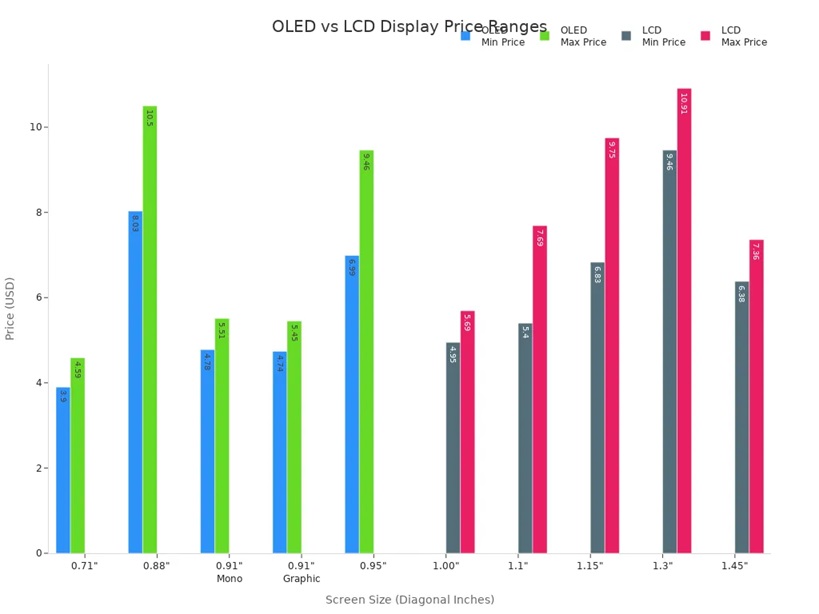
Over the past five years, oled TVs have dropped in price. You can now find many models under $900. LCD TVs stay competitive, with 55-inch screens costing between $400 and $600. This price comparison helps you choose the right display for your budget.
Long-Term Value
When you think about long-term value, you need to look at more than just the price tag. Oled displays save energy when showing dark images because pixels can turn off. LCD screens use a backlight all the time, which may use less power for bright content. Repairs for oled cost more since you often need to replace the whole panel. LCD repairs are cheaper and parts are easy to find.
|
Aspect |
OLED Displays |
LCD Displays |
|---|---|---|
|
Energy Efficiency |
More efficient with dark content; pixels can turn off |
May consume less power with bright content due to constant backlight |
|
Repair Costs |
Generally more expensive; often requires full panel replacement |
Typically cheaper; parts are more abundant and easier to replace |
Oled technology holds its value well. XDR oled screens keep about 92% of their value after one year. Standard smartphone displays keep 75-80%. Premium features like XDR oled stay valuable, even when new models come out. Resale values for AR-ready screens are 15-20% higher than regular screens. LCD technology still leads the market because it is reliable and affordable. You see lcd in many devices for work and school.
Tip: If you want a display that saves energy and keeps its value, oled is a smart choice. If you want lower repair costs and a good price, lcd works well for most needs.
Best Uses for Each Display
Gaming
When you play games, you want fast action and smooth graphics. Many pro gamers pick monitors with high refresh rates and low response times. The XL2546K monitor has a 240Hz refresh rate and a 1ms response time. OLED displays change pixels quickly. But lots of gaming monitors still use lcd because they can reach high refresh rates and cost less money. If you play games to compete, lcd monitors with 1920×1080 resolution work well.
|
Feature |
Importance for Gamers |
|---|---|
|
Refresh Rate |
High |
|
Response Time |
Low |
|
Resolution |
1920×1080 |
|
Monitor Example |
XL2546K (240Hz, 1ms) |
Tip: Pick lcd if you want fast games and a lower price. Choose oled if you want cool visuals and deep blacks.
Creative Work
For creative work, you need sharp images and true colors. OLED displays give better contrast because each pixel can turn off by itself. This means you see sharper images and more real colors. If you do photography or graphic design, color accuracy is very important. OLED monitors are great for this. They show bright colors and do not have a halo effect.
-
Contrast: OLED displays make images look sharper.
-
Brightness: LCD screens are brighter overall.
-
Viewing Angles: OLED keeps the picture clear from the side.
If you work in photography, graphic design, or content creation, and you care about color accuracy, an oled monitor is probably the best choice.
General and Office Use
You might spend many hours in front of your screen at work or school. LCD screens work best in bright rooms. They are very bright and fit office lighting. OLED works well in dark rooms and shows great blacks and picture quality.
|
Display Type |
Best Environment |
Performance Characteristics |
|---|---|---|
|
OLED |
Dimly lit rooms |
Great blacks make the picture look better |
|
LCD |
Bright environments |
Very bright, good for rooms with lots of light |
Movies and TV
If you want a great home theater, oled displays are a good pick. They have self-emissive pixels for better picture quality. You get wide viewing angles, about 70 degrees, so everyone can see the screen clearly. OLED TVs also have less blue light and flicker, so your eyes feel better during long movies.
-
OLED displays give you the best picture quality.
-
Wide viewing angles let everyone see well in the room.
-
Less blue light and no flicker help protect your eyes.
Budget Buyers
If you want a good screen but do not want to spend a lot, lcd screens are a smart pick. They cost less and come in many sizes. LCD screens last longer and almost never get burn-in. If you just need a screen for simple tasks, lcd is a good choice. OLED costs more but gives you better visuals if you want to spend extra.
Note: LCD screens are good for most budgets and daily use. OLED displays are for people who want the best features.
Pros and Cons Summary
OLED Pros and Cons
You see many benefits when you choose an oled display. The picture looks sharp and colors stand out. You get deep blacks and wide viewing angles. The screen is thin and flexible, so it fits in many devices. Gamers enjoy faster response times with oled displays. You also notice some drawbacks. Burn-in can happen if you show the same image for a long time. The cost is higher because making oled screens takes more work. Sometimes, the screen does not get as bright as lcd.
Here is a quick table to help you compare:
|
Pros |
Cons |
|---|---|
|
Superior visual quality |
Burn-in / image retention |
|
Thin and flexible designs |
High manufacturing cost |
|
Wide viewing angles |
Lower brightness |
|
Faster response time |
|
Tip: If you want the best picture and fast action, oled gives you a great experience. You need to watch out for burn-in and higher prices.
LCD Pros and Cons
You find lcd screens in many devices because they are reliable and bright. The images look sharp at the native resolution. You get flat screens with a small footprint. Lcd uses less electricity and works well in bright rooms. You do not worry about burn-in. You also see some downsides. The viewing angle is limited, so colors can change when you move. Lcd has trouble showing deep blacks and high contrast. Sometimes, you notice bad pixels or uneven lighting. Motion can blur if the response time is slow.
Here is a list to help you see the main points:
-
Pros:
-
Sharp images at native resolution
-
No geometric distortion
-
High brightness for sunlight visibility
-
Flat and thin screens
-
Low electricity use
-
-
Cons:
-
Fixed resolution can cause image problems when rescaled
-
Limited viewing angles affect color and brightness
-
Lower contrast and trouble with deep blacks
-
Possible bad pixels and uneven screen lighting
-
Motion blur with slow response times
-
Note: Lcd works well for everyday use and bright rooms. You get a good price and long lifespan, but you may see less contrast and color accuracy.
How to Choose
Matching Needs and Preferences
You want a screen that fits your lifestyle and budget. Start by thinking about what matters most to you. If you love movies or games, you may want an oled display for its deep blacks and vibrant colors. If you use your device outside or need something affordable, lcd might suit you better. You should also consider how long you plan to use your screen and how much energy it uses.
Here is a table to help you compare important criteria:
|
Criteria |
OLED Displays |
LCD Displays |
|---|---|---|
|
Picture Quality |
Vibrant colors, deep blacks |
May lose color over time, less contrast |
|
Lifespan |
Can degrade, especially blue pixels |
Lasts longer, less risk of burn-in |
|
Energy Efficiency |
Saves power with dark images |
Varies with content |
|
Cost |
Higher price, advanced technology |
Lower price, easier to find |
|
Color Accuracy |
Very accurate, true to life |
Not as vibrant |
|
Contrast Ratio |
Superior, makes images pop |
Lower, less dramatic |
You should pick lcd if you want lower cost and good energy efficiency. Choose oled if you want the best colors and contrast. Think about how long you want your screen to last. Oled may fade over time, while lcd stays strong.
Tip: Match your choice to your main use. If you want a screen for creative work or movies, oled displays give you the best experience. For everyday tasks or outdoor use, lcd works well.
Key Questions to Ask
Before you buy, ask yourself a few simple questions. These will help you decide which display fits your needs.
-
What is an oled?
-
Should you pick lcd, TFT, or oled?
-
Can you use your display in direct sunlight?
-
How important is picture quality for you?
-
Do you care about energy savings?
-
Will you use your screen for many years?
-
Is your budget limited?
You should answer these questions based on your daily habits. If you want a screen that looks great and lasts, think about how you use your device. Oled gives you amazing visuals, but lcd offers durability and value.
Note: Your needs and preferences guide your choice. Take time to compare features and ask questions before you decide.
If you want deep blacks and bright colors, pick oled. Oled screens are thin and light. Movie lovers, gamers, and artists like oled best. If you want a screen that lasts longer and costs less, lcd is better. Lcd works well for daily use and saving money. Look at the table below to see the main features:
|
Feature |
OLED |
LCD |
|---|---|---|
|
Visual Quality |
Superior |
Good |
|
Lifespan |
Shorter |
Longer |
|
Cost |
Higher |
Lower |
Think about what you use your screen for, your budget, and how long you want it to last.
FAQ
What is screen burn-in, and should you worry about it with OLED?
Screen burn-in happens when a static image stays on your OLED screen for a long time. You may see a faint shadow left behind. You can avoid burn-in by changing what you display often.
Can you use an LCD or OLED display outside?
LCD screens work better outside because they get brighter. You see the screen clearly in sunlight. OLED screens may look dim outdoors, especially in direct sunlight.
Which display lasts longer, OLED or LCD?
LCD displays usually last longer. You get more years of use before the screen fades. OLED screens can lose brightness over time, especially the blue pixels.
Are OLED displays better for your eyes?
OLED screens show less blue light and flicker. You may feel less eye strain during long use. You still need to take breaks to protect your eyes.