Seagate Exos X18 12TB Review: Specs, Performance and Enterprise Use Cases
If you are selecting a hard drive for a server, RAID array, data center, or large-scale storage system, capacity alone should not determine your decision. You also need to consider interface compatibility, sustained performance, workload requirements, recording technology, reliability, and the way the drive will operate over its service life.
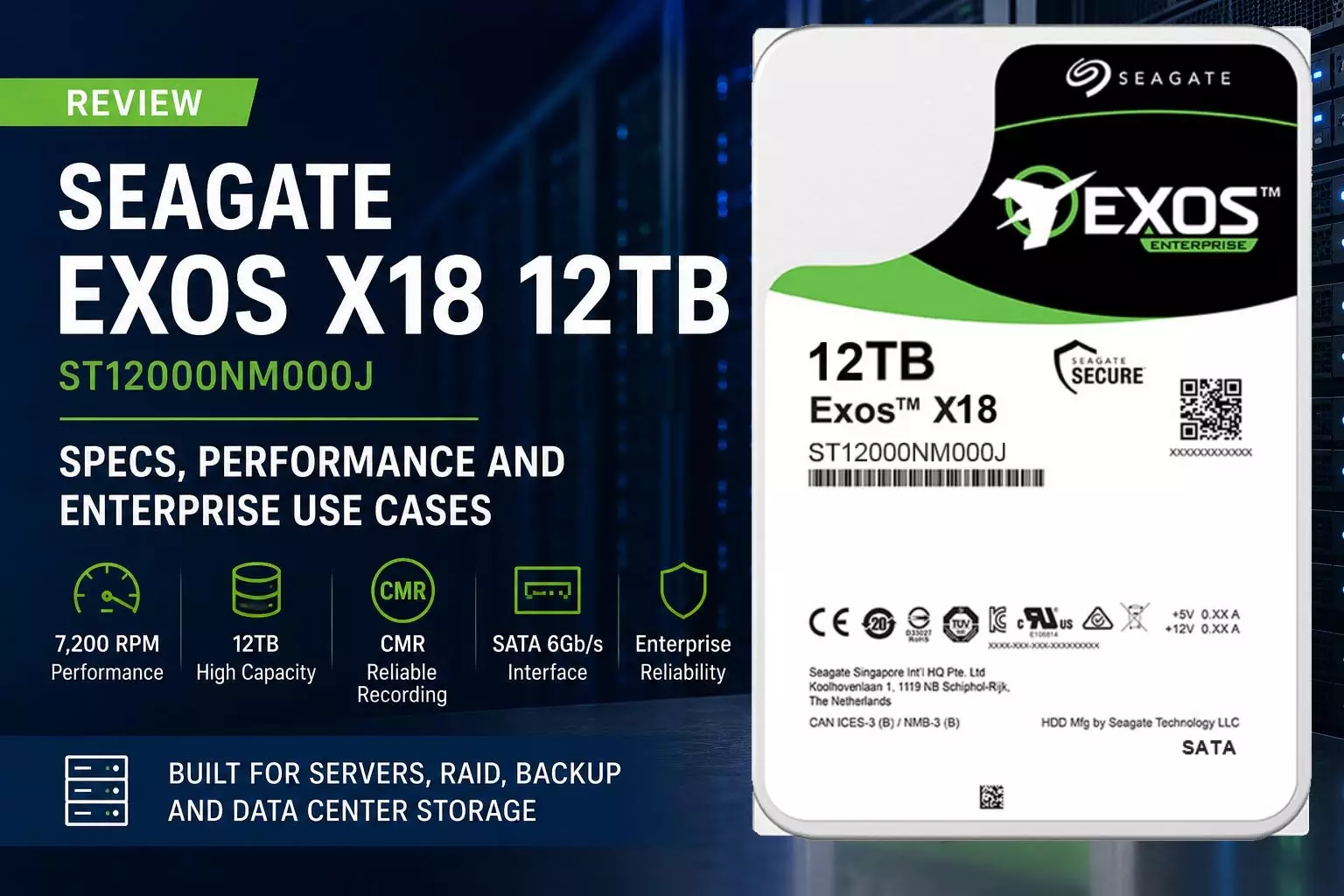
The Seagate Exos X18 12TB is designed for exactly this type of environment. In this review, you will see what the drive offers, how the ST12000NM000J SATA model performs on paper, where it fits in an enterprise storage architecture, and when it makes sense to choose it over a consumer or NAS-oriented hard drive.
The Seagate Exos X18 12TB ST12000NM000J is a 3.5-inch enterprise SATA HDD with 12TB capacity, 7200 RPM rotational speed, 256MB cache, CMR recording, helium-sealed construction, and a SATA 6Gb/s interface. It is designed for high-capacity enterprise storage workloads, including servers, RAID systems, cloud storage, and data-center environments.
Seagate Exos X18 12TB: Key Specifications
Before deciding whether this enterprise HDD is right for your system, you should first verify the exact model number.
The AILINK100 product page covers ST12000NM000J, the SATA version of the 12TB Exos X18. Seagate's documentation also identifies ST12000NM000J as a 12TB SATA 6Gb/s standard model.
| Specification | Seagate Exos X18 12TB ST12000NM000J |
|---|---|
| Product Series | Seagate Exos X18 |
| Model | ST12000NM000J |
| Capacity | 12TB |
| Form Factor | 3.5-inch |
| Interface | SATA 6Gb/s |
| Spindle Speed | 7,200 RPM |
| Cache | 256MB |
| Recording Technology | CMR |
| Drive Design | Helium-sealed |
| Sustained Transfer Rate | Up to approximately 270 MB/s |
| Annual Workload Rating | Up to 550TB/year |
| MTBF | Up to 2.5 million hours |
The figures above are based on AILINK100's current product information and Seagate's Exos X18 documentation. For an actual deployment, you should always verify the exact part number, firmware, interface, sector format, and server compatibility before placing a bulk order.
What Is the Seagate Exos X18 12TB Designed For?
The Exos X18 belongs to Seagate's enterprise HDD family rather than its consumer-oriented storage products.
That distinction matters when you are building infrastructure.
A 12TB enterprise HDD is typically selected when you need a combination of:
-
High storage density
-
Continuous operation
-
Predictable sustained performance
-
RAID or large storage arrays
-
Enterprise server compatibility
-
High annual workload capability
-
Large-scale deployment economics
Seagate's documentation identifies the Exos X18 family as enterprise drives and lists features including helium-sealed construction, CMR recording, PowerChoice idle power technology, PowerBalance power/performance technology, and hot-plug support.
For you, the key takeaway is simple: the Exos X18 12TB is designed to be part of a storage infrastructure, not merely a large-capacity desktop hard drive.
Seagate Exos X18 12TB Performance Review
7,200 RPM for Consistent Enterprise HDD Performance
The Exos X18 12TB operates at 7,200 RPM.
That does not make it comparable to an NVMe SSD in latency or random I/O performance. You should not buy an enterprise HDD expecting SSD-like responsiveness.
Instead, the advantage is its balance between:
-
Large capacity
-
Sequential throughput
-
Enterprise workload capability
-
Cost per terabyte
-
Long-duration operation
For workloads dominated by sequential reads and writes, bulk storage, backup, media repositories, data lakes, and other capacity-oriented applications, this design makes considerably more sense than using premium SSD capacity for every terabyte.
Up to Approximately 270 MB/s Sustained Transfer
The SATA Exos X18 documentation lists sustained transfer performance of up to approximately 270 MB/s, depending on the specific capacity and operating conditions.
When you evaluate this number, keep the workload in mind.
If your application is dominated by:
-
Sequential file transfers
-
Backup and restore
-
Large datasets
-
Archive workloads
-
Video repositories
-
Bulk data storage
a high-capacity enterprise HDD can be an effective storage layer.
If your workload requires extremely low latency or very high random IOPS, you should instead evaluate enterprise SSDs or NVMe storage.
Why CMR Matters on the Exos X18 12TB
One of the most important specifications to check when buying a hard drive for an enterprise storage system is the recording technology.
The Exos X18 uses Conventional Magnetic Recording (CMR). Seagate's product documentation explicitly lists CMR for the X18 family.
Why does this matter?
If you are building RAID arrays or other write-intensive storage systems, predictable write behavior is important. CMR drives are generally preferred for workloads where sustained and consistent write behavior is more important than maximizing areal density through alternative recording techniques.
For this reason, the Exos X18 12TB can be a sensible option when you are evaluating HDDs for:
-
RAID storage
-
Enterprise file servers
-
Backup systems
-
Large storage arrays
-
Data-center capacity tiers
Is Seagate Exos X18 12TB CMR or SMR?
The Seagate Exos X18 12TB ST12000NM000J is a CMR drive, not an SMR drive. Seagate's official Exos X18 documentation lists Conventional Magnetic Recording as a feature of the family.
This is an important point to verify before deploying multiple HDDs in a RAID or enterprise storage environment.
Helium-Sealed Design: Why It Matters
The Exos X18 uses a helium-sealed drive design.
Seagate lists the helium-sealed architecture as one of the core features of the Exos X18 family.
The practical objective is to reduce the resistance experienced by the internal platters and heads compared with an air-filled design, helping support higher storage density and power efficiency.
For a single drive, the difference may not be the primary purchasing factor.
For a storage system containing dozens or hundreds of drives, however, small differences in power and density can become much more meaningful.
This is one reason enterprise HDD design needs to be evaluated at the system level, rather than by looking at capacity and RPM alone.
Seagate Exos X18 12TB Workload and Reliability
The AILINK100 listing specifies an annual workload rating of up to 550TB/year and an MTBF figure of 2.5 million hours for the listed ST12000NM000J configuration.
These numbers are useful when comparing enterprise HDDs, but you should interpret them correctly.
An MTBF figure is not a prediction that an individual drive will run for 2.5 million hours. It is a statistical reliability metric used in product and fleet-level evaluation.
Likewise, the annual workload rating should be compared with your expected storage traffic.
For example, if your server performs frequent backups, large data transfers, analytics workloads, or other high-volume operations, estimating the expected annual data written and read can help you determine whether an enterprise HDD is appropriately specified.
Is Seagate Exos X18 12TB Good for Servers?
Yes, provided that the interface, sector format, firmware, and physical compatibility match your server or storage controller.
The Exos X18 is designed for enterprise environments, and Seagate provides both SATA and SAS variants within the X18 family.
For the specific ST12000NM000J, you are looking at the SATA 6Gb/s version.
Before purchasing, check:
-
Does your server backplane support SATA 6Gb/s?
-
Does the RAID controller support the drive?
-
Is the 3.5-inch form factor supported?
-
Does your server accept the drive's capacity?
-
Is the sector format compatible with your storage software?
-
Does the server vendor list the drive or an equivalent model as supported?
This is particularly important for enterprise procurement because a physically compatible HDD is not necessarily a fully validated HDD for every server platform.
Is Seagate Exos X18 12TB Good for RAID?
The Exos X18 is designed for enterprise storage environments and can be used as part of RAID-based storage architectures when the RAID controller, server, backplane, and firmware configuration support the drive. AILINK100 specifically positions the ST12000NM000J for RAID systems and enterprise storage workloads.
For a RAID deployment, however, you should evaluate more than the HDD itself.
Consider:
-
RAID level
-
Number of drives
-
Controller compatibility
-
Hot-spare strategy
-
Rebuild time
-
Backup policy
-
Failure-domain design
-
Expected workload
-
Required usable capacity
For example, increasing the number of 12TB HDDs can provide substantial raw capacity, but RAID configuration determines how much of that capacity is actually available to your applications.
In other words, 12TB per drive does not mean 12TB of usable storage per drive after RAID configuration.
SATA vs SAS: Make Sure You Choose the Correct Exos X18 Model
This is one of the most important purchasing considerations.
The Exos X18 family includes different interfaces and model numbers.
For 12TB, Seagate's documentation identifies:
-
ST12000NM000J — SATA 6Gb/s
-
ST12000NM004J — SAS 12Gb/s
There are also SED and SED-FIPS variants with different model numbers.
Therefore, if your storage system requires SAS, you should not automatically order the SATA ST12000NM000J simply because the capacity is correct.
Likewise, if your server is designed around SATA, you should verify that a SAS model is actually supported before switching interfaces.
Quick comparison
| Requirement | ST12000NM000J | ST12000NM004J |
|---|---|---|
| Capacity | 12TB | 12TB |
| Interface | SATA 6Gb/s | SAS 12Gb/s |
| Typical deployment | SATA servers/storage systems | SAS enterprise storage systems |
| Same model? | No | No |
| Direct replacement | Only when system supports it | Only when system supports it |
The official Seagate documentation should be your final reference for model-level specifications.
Who Should Consider the Seagate Exos X18 12TB?
The drive is particularly relevant when you need high-capacity HDD storage and your infrastructure supports SATA enterprise drives.
1. Enterprise File Servers
If you need large volumes of shared business data, the 12TB capacity can help increase storage density without moving every workload to SSD.
2. Backup and Disaster Recovery Storage
For backup repositories, capacity and cost per terabyte are often more important than ultra-low latency.
The Exos X18 can therefore make sense as a high-capacity storage layer, provided the overall backup architecture is properly designed.
3. RAID Storage Arrays
CMR recording and enterprise-oriented specifications make the drive relevant to large HDD arrays, subject to controller and platform compatibility.
4. Data Center Storage
If you are managing a large number of drives, capacity density, workload rating, power efficiency, and predictable operation become important purchasing criteria.
The Exos X18's enterprise positioning and helium-sealed architecture are designed around this type of environment.
5. Cloud and Hyperscale Storage
The Exos X18 family is positioned for enterprise and hyperscale storage applications.
For large deployments, however, you should evaluate the complete storage platform rather than selecting drives in isolation.
Who Should Not Buy an Exos X18 12TB?
You should think twice if your primary requirement is extremely low latency or very high random I/O performance.
For workloads such as:
-
High-transaction databases
-
AI training scratch storage
-
High-IOPS virtualization tiers
-
Low-latency application storage
-
Performance-critical metadata workloads
an enterprise NVMe SSD or other enterprise SSD may be more appropriate.
The Exos X18's strength is high-capacity, enterprise HDD storage, not replacing NVMe SSDs in latency-sensitive workloads.
Seagate Exos X18 12TB vs Consumer HDDs
Why would you choose an enterprise HDD instead of a conventional desktop hard drive?
The answer is the target workload.
Consumer HDDs are generally optimized for cost-effective personal computing and general storage.
The Exos X18 is designed around enterprise requirements such as:
-
24/7 operation
-
High annual workloads
-
Large-scale storage
-
RAID environments
-
Data-center deployments
-
Enterprise reliability requirements
Seagate's official documentation lists enterprise-oriented technologies and features across the Exos X18 family, including CMR, helium-sealed construction, PowerChoice, PowerBalance, and hot-plug support.
If you are building a business-critical storage array, the correct comparison is therefore not simply:
“Which 12TB HDD is cheapest?”
A better question is:
“Which 12TB HDD is appropriate for my workload, storage architecture, and expected operating environment?”
Seagate Exos X18 12TB: Main Advantages and Limitations
Advantages
High 12TB capacity: You can add substantial storage capacity while keeping drive count manageable.
Enterprise-oriented design: The Exos X18 is built for enterprise storage applications rather than ordinary desktop workloads.
CMR recording: Useful for applications where consistent write behavior is important.
7,200 RPM: Provides a reasonable balance between HDD performance, capacity, and operating efficiency.
256MB cache: Provides additional buffering for storage workloads.
Helium-sealed architecture: Supports the high-density design of the Exos X18 family.
SATA 6Gb/s interface: Makes ST12000NM000J suitable for compatible SATA-based servers and storage systems.
Limitations
HDD latency:
It cannot compete with enterprise NVMe SSDs for latency and random I/O.
Interface-specific compatibility:
You must verify that your server or controller supports SATA.
12TB raw capacity is not always 12TB usable:
RAID, filesystem formatting, and system overhead reduce available capacity.
Enterprise HDD acoustics and vibration:
A data-center-class HDD may not be the ideal choice for a quiet home or office environment.
How Should You Buy Seagate Exos X18 12TB for a Server Project?
If you are purchasing one drive for evaluation, the process is relatively straightforward.
For a business or data-center deployment, you should approach the purchase differently.
Step 1: Confirm the Exact Part Number
Do not order simply by searching for “Exos X18 12TB.”
Confirm whether you need:
ST12000NM000J SATA
or another model such as:
ST12000NM004J SAS
Seagate's documentation confirms that these are different interface variants.
Step 2: Confirm Server Compatibility
Provide your:
-
Server brand
-
Server model
-
RAID controller
-
Backplane
-
Existing HDD model
-
Required capacity
-
Interface
This allows your supplier to check compatibility before you purchase in volume.
Step 3: Calculate Usable RAID Capacity
If you are buying multiple 12TB drives, calculate usable capacity based on your RAID level rather than simply multiplying 12TB by the number of drives.
Step 4: Consider Your Annual Workload
Compare your expected workload against the drive's rated workload.
AILINK100 lists the ST12000NM000J with an annual workload rating of up to 550TB/year.
Step 5: Ask for a Sample Before a Large Deployment
For larger enterprise projects, testing a sample drive in your actual server and RAID environment is a sensible procurement practice.
You can validate:
-
Drive detection
-
RAID controller compatibility
-
Firmware behavior
-
SMART information
-
Sustained performance
-
Temperature
-
Rebuild behavior
This is much safer than discovering a compatibility issue after purchasing an entire batch.
Final Verdict: Is Seagate Exos X18 12TB Worth Considering?
The Seagate Exos X18 12TB ST12000NM000J is a strong option when your priority is high-capacity enterprise SATA storage rather than SSD-level latency.
You should consider it if you need:
-
12TB enterprise HDD capacity
-
7,200 RPM performance
-
CMR recording
-
SATA 6Gb/s connectivity
-
RAID-compatible storage
-
Server or data-center deployment
-
High annual workload capability
-
Large-scale storage density
You should look at enterprise SSD or NVMe alternatives if your workload is dominated by random I/O, latency-sensitive applications, or very high IOPS requirements.
Most importantly, do not choose the drive based on capacity alone. Confirm the exact model number, interface, controller compatibility, workload, RAID design, and deployment environment before you place your order.
For the ST12000NM000J specifically, AILINK100 currently lists it as a 12TB Seagate Exos X18 enterprise SATA HDD with 7200 RPM, 256MB cache, CMR recording, and a SATA 6Gb/s interface. You can use the product page to request availability, pricing, and compatibility support for your server or storage project.
Frequently Asked Questions About Seagate Exos X18 12TB
Is Seagate Exos X18 12TB a good enterprise hard drive?
Yes. The Exos X18 is an enterprise HDD family designed for large-scale storage environments. The ST12000NM000J provides 12TB capacity, 7200 RPM, SATA 6Gb/s connectivity, CMR recording, and enterprise-oriented workload specifications.
Is the Seagate Exos X18 12TB CMR?
Yes. The Exos X18 family uses Conventional Magnetic Recording (CMR), including the 12TB ST12000NM000J model.
Is Seagate Exos X18 12TB suitable for RAID?
Yes, when the server, RAID controller, backplane, firmware, and drive interface are compatible. It is positioned for enterprise storage and RAID applications.
Is ST12000NM000J SATA or SAS?
ST12000NM000J is the 12TB SATA 6Gb/s model. The 12TB SAS variant is ST12000NM004J.
How fast is the Seagate Exos X18 12TB?
The SATA Exos X18 documentation specifies sustained transfer performance of up to approximately 270 MB/s, depending on the exact model and operating conditions.
Is Exos X18 better than an SSD?
Not universally. Exos X18 is better suited to high-capacity, cost-efficient enterprise HDD storage, while enterprise SSDs are generally preferable for workloads requiring very low latency and high random IOPS.
Can you use Exos X18 12TB in a server?
Yes, provided the server, backplane, storage controller, firmware, form factor, interface, and sector format support the specific drive. For ST12000NM000J, you need a compatible SATA storage architecture.
Where can you buy Seagate Exos X18 12TB ST12000NM000J?
AILINK100 currently offers the Seagate Exos X18 12TB ST12000NM000J and provides product inquiry and enterprise storage procurement support. For larger deployments, it is advisable to provide your server or storage configuration so compatibility can be checked before purchasing.