You need the best enterprise hard drives in 2026 to scale massive server infrastructure efficiently. High-density cloud storage environments require proven drives like the Seagate Exos X series, Western Digital Gold, and Toshiba MG Series. These enterprise hard drives handle intense continuous workloads in your data center.
Your procurement strategy must evaluate critical metrics beyond upfront cost-per-terabyte. You should match drive workload ratings to your system requirements while choosing SAS or SATA interface options for each server chassis. Modern high-capacity mechanical hard disk drives ensure operational reliability during continuous year-round performance. Selecting the right hardware protects your scalable storage investment.
Key Takeaways
-
Select high-capacity drives like Seagate Exos or WD Gold to scale your data center efficiently.
-
Match SAS or SATA drive interfaces to your specific server chassis and workload requirements.
-
Combine high-speed solid-state drives with mechanical hard drives to create a balanced tiered storage system.
-
Helium-sealed drive designs reduce internal gas friction and lower overall power consumption by fifty percent.
Best Enterprise Hard Drives for 2026
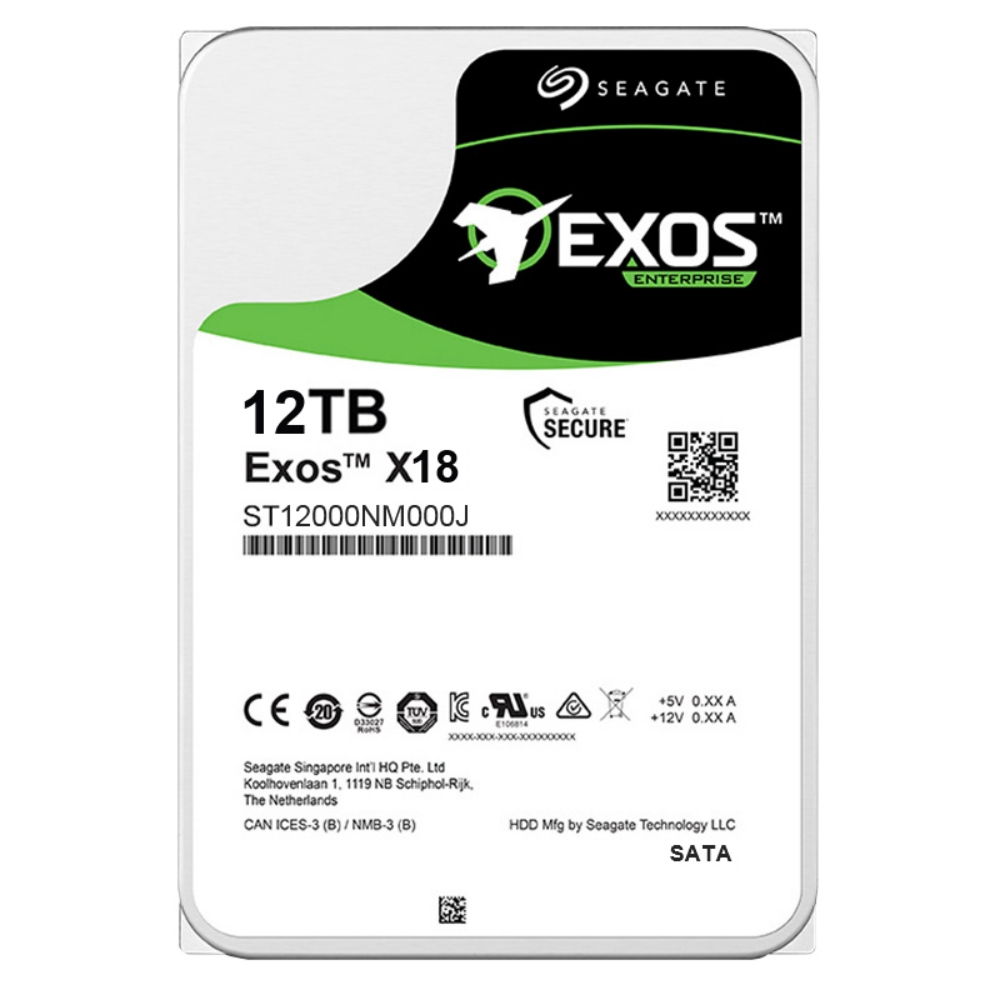
You need the best enterprise hard drives to manage growing operational volumes across your infrastructure. Selecting high-capacity enterprise storage hard drives allows your data center to achieve peak efficiency. Modern server chassis rely on specialized drives built for heavy continuous workloads.
Top Drives for Mass Data Density
Leading manufacturers offer exceptional server hdd options designed for demanding rack environments. Seagate delivers maximum server hdd capacities through its Mozaic 3+ HAMR platform, reaching 32TB with the Exos M ST32000NM000K drive. You can also deploy the Seagate Exos M ST30000NM004K at 30TB SATA or the Exos X24 ST24000NM007H at 24TB SAS.
Western Digital expands enterprise hard drives options with the WD Gold 26TB drive, which utilizes ePMR and OptiNAND technologies. Meanwhile, Toshiba provides the MG11 series at 24TB using FC-MAMR technology and a 1GB cache. The table below compares these top models across key server hdd specifications:
|
Model |
Capacity |
Interface |
Workload Rating |
Spin Rate |
|---|---|---|---|---|
|
Seagate Exos M ST32000NM000K |
32TB |
SATA 6Gb/s |
550 TB/year |
7200 RPM |
|
Seagate Exos M ST30000NM004K |
30TB |
SATA 6Gb/s |
550 TB/year |
7200 RPM |
|
WD Gold 26TB |
26TB |
SATA 6Gb/s |
550 TB/year |
7200 RPM |
|
Toshiba MG11 |
24TB |
SATA 6Gb/s |
550 TB/year |
7200 RPM |
Each enterprise hdd option includes critical enterprise features like rotational vibration protection and 5-year warranties. These enterprise features ensure system stability when you install dozens of drives inside a single server enclosure.
Performance Comparison of Leading Models
Evaluating mechanical hdd speed helps you match each server hdd to your operational workload. Read and write speeds vary across technologies, as shown in manufacturer tests and independent evaluations:
|
Drive Model |
Rated Speed |
Independent Sequential Read |
Independent Sequential Write |
|---|---|---|---|
|
Seagate Exos M 30TB |
275 MB/s |
292 MB/s |
289 MB/s |
|
Western Digital Gold 26TB |
288 MiB/s (~302 MB/s) |
283–285 MB/s |
Not reported |
|
Toshiba MG11 24TB |
295 MiB/s (~309 MB/s) |
Limited data |
Not reported |
Sequential throughput represents only one aspect of overall drive performance. You must also evaluate random access IOPS when configuring a server for mixed cloud storage applications. Standard mechanical units deliver moderate random IOPS compared to enterprise-grade SSDs for data centers. However, high-density server hdd drives remain essential for cost-effective bulk retention.
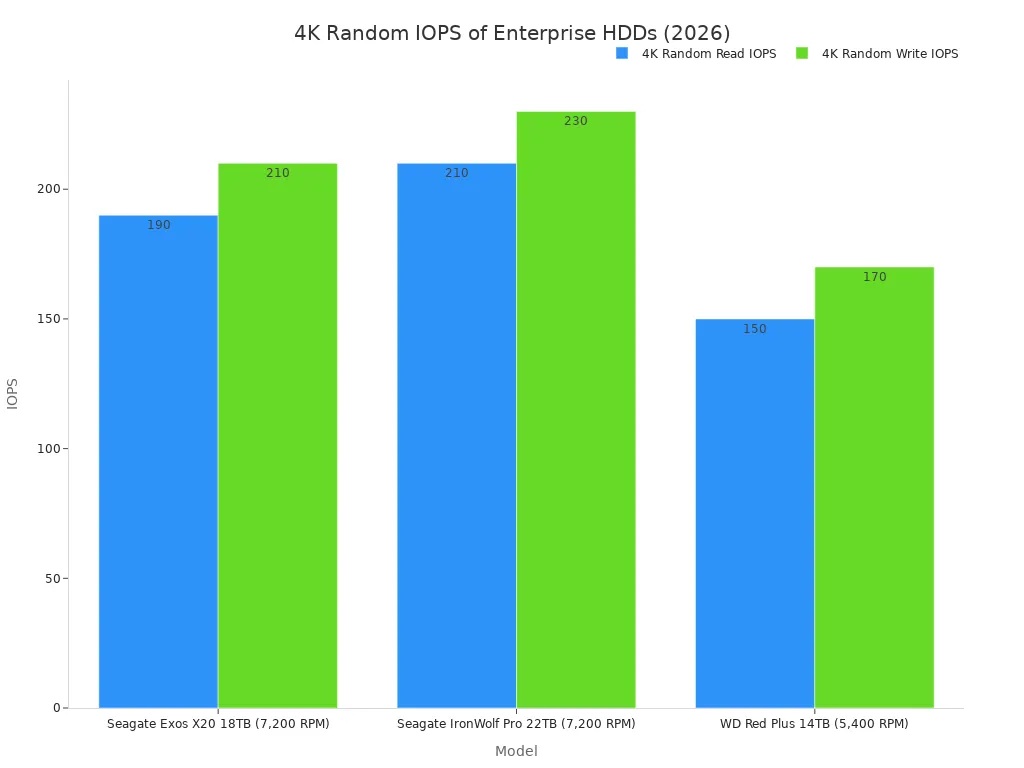
As the chart illustrates, the 7,200 RPM Seagate IronWolf Pro 22TB reaches ~210 4K random read IOPS and ~230 4K random write IOPS. The Seagate Exos X20 18TB achieves ~190 4K random read IOPS and ~210 4K random write IOPS. The 5,400 RPM WD Red Plus 14TB trails with ~150 4K random read IOPS and ~170 4K random write IOPS.
Integrating high-performance server hdd units alongside ssd cache tiers creates balanced storage architectures. Advanced enterprise features such as thermal throttling control drive health across dense racks. Furthermore, hardware encryption enterprise features safeguard sensitive data across active server deployments. Choosing the best enterprise hard drives ensures scalable capacity, long-term endurance, and consistent throughput for your enterprise hard drives fleet.
Key Selection Criteria for Enterprise Hard Drives
You must evaluate critical technical factors before purchasing high-capacity enterprise storage hard drives for your storage array. Selecting the correct drive architecture prevents system bottlenecks and maximizes physical density.
Capacity, Interface, and Rotational Speed
Interface selection defines overall system topology and drive communication speed. Enterprise infrastructure relies primarily on Serial Attached SCSI (SAS) and Serial ATA (SATA) protocols.
A SAS controller or backplane accepts SATA drives, but a SATA controller will never accept a SAS drive.
This hardware design rule governs connection matching across every rack enclosure. A dual-port SAS enterprise hdd provides multi-path redundancy for mission-critical operations, whereas SATA offers cost-effective connections for bulk data. You should select enterprise-grade SSDs for data centers when your workloads demand sub-millisecond access times. However, mechanical drives deliver superior cost-per-terabyte storage efficiency. Spindle rotational speed directly impacts access latency and sequential throughput, as outlined in the following table:
|
Spindle Speed |
Class |
Strengths |
Best For |
|---|---|---|---|
|
7,200 RPM |
Midline / nearline (3.5") |
Highest capacity, lowest cost per TB, low power |
Backups, archives, bulk cold storage |
|
10,000 RPM |
Enterprise (2.5") |
Balance of speed, capacity, density |
General-purpose and moderate-performance workloads |
|
15,000 RPM |
Performance enterprise (2.5") |
Lowest HDD latency, highest HDD IOPS |
Legacy performance needs |
Increasing spindle speed from 7,200 RPM to 10,000 RPM reduces average rotational latency from 4.17 ms to 3.00 ms. Higher rotational speeds elevate drive power consumption and heat output within dense chassis setups. Therefore, nearline 7,200 RPM units supply the primary high-density capacity required for large server storage pools. Evaluating endurance specs ensures your server hdd setup handles expected write traffic without unexpected failure. Workload ratings measure endurance via Total Bytes Written (TBW) or Drive Writes Per Day (DWPD). Matching drive endurance to daily write volume maintains overall server stability.
Power-On Hours, MTBF, and Reliability Features
Data center systems require non-stop operation, making drive hardware durability essential. Modern enterprise hard drives support continuous operational demands through rigorous manufacturing standards. System administrators begin replacement planning around 25,000–30,000 Power-On Hours (POH) to prevent unexpected hardware downtime. You can evaluate statistical failure probabilities using established reliability formulas:
|
Reliability Metric |
Formula |
Impact on Selection |
|---|---|---|
|
MTBF (Mean Time Between Failures) |
Total operational time between failures / number of failures |
Higher values indicate longer expected lifespan and lower downtime risk. |
|
Annual Workload Rate |
(Lifetime Writes + Lifetime Reads) * (8760 / Lifetime Power On Hours) |
Exceeding rated transfer limits accelerates wear and voids warranties. |
Hardware design incorporates special enterprise features to protect high-density multi-drive arrays. Integrated rotational vibration sensors detect external chassis movement. The internal controller adjusts actuator positioning to counter dynamic disturbances from adjacent drive units.
Time-Limited Error Recovery (TLER) limits bad sector recovery attempts to approximately 7 seconds, notifying the hardware RAID controller immediately to preserve array stability.
These enterprise features optimize drive error handling while maintaining server responsiveness under heavy load. Specialized firmware queuing protocols improve multi-client performance during parallel command execution. Enterprise features like active head parking, advanced data protection algorithms, and automated power management reduce operational risks. Selecting hardware with robust enterprise features guarantees operational reliability across your entire server hdd infrastructure.
Workload Matching and Drive Architecture
SAS vs. SATA Interface Requirements
You must match server hdd choices directly to specific operational demands. Enterprise hard drives with SAS interfaces support throughput up to 12-24 Gbps while supplying advanced error detection and correction. In contrast, SATA server hdd models provide transfer speeds up to 6 Gbps alongside basic error correction features. Selecting a SAS server hdd fits mission-critical databases, e-commerce platforms, and virtual machine clusters requiring multi-threaded transactions without latency.
Storage administrators deploy solid-state drives when workload operations demand instant data access. Deploying fast ssd arrays alongside nearline storage creates a balanced topology. Evaluating drive endurance prevents premature hardware failure in continuous write environments. Read-intensive applications need lower endurance ratings around 1 DWPD or less. Mixed-use workloads require 3 DWPD endurance for transactional processing. Write-intensive data ingest pipelines demand 10 DWPD ratings to sustain heavy daily writes. This strategic tiering optimizes overall system performance across all storage nodes.
Helium Technologies and Actuator Innovations
Helium sealing increases drive capacity by eliminating internal air turbulence. Sealing inert gas inside the chassis permits nine thin platters within a standard 3.5-inch server hdd frame. Helium-sealed Toshiba MG08 series units lower power consumption per gigabyte by approximately 50 percent compared to air-filled hdd designs. Lowering power usage expands rack capacity while maintaining safe operating temperatures in every server chassis. Advanced enterprise features protect drive head positioning against continuous vibration.
Actuator innovations maintain precise head positioning across densely packed magnetic platters. Dual-stage actuators combine a 200nm milli-actuator and a 100nm micro-actuator for tight track alignment. Multi-actuator assemblies like Seagate MACH.2 double IOPS performance and boost sequential performance while delivering up to 480MB/s sustained read speeds. These specialized enterprise features balance mechanical server hdd execution with secondary ssd caching. Deploying each high-density server hdd with modern enterprise features maintains high server reliability.
Deploying Drives in Scalable Infrastructure
Integration within Tiered Storage Systems
You can build a scalable data storage infrastructure by pairing enterprise-grade SSDs for data centers with high-capacity enterprise storage hard drives. Modern hybrid architectures deploy fast solid-state drives or a dedicated enterprise ssd at the compute edge. Integrated enterprise features allow this layer to route rapid burst writes to a high-speed ssd cache layer. As a result, your storage fabric processes incoming read and write requests with minimal latency while protecting primary drive arrays.
Your storage controller moves older data files to a bulk server hdd pool for long-term retention. For example, large AI training clusters deploy 46 PB of NVMe cache across 6,080 GPUs to maximize workload performance during active operations. Checkpointing tasks write temporary data onto high-speed flash before migrating those files into large server hdd arrays. This tiered deployment protects write endurance while optimizing total drive capacity across your cloud storage network.
Chassis Density, Thermal Management, and Expansion
High-density chassis layouts require proper environmental controls to shield your server hardware from physical wear. Installing a server hdd inside dense rack chassis causes high thermal loads and acoustic vibration. Heavy mechanical vibration degrades drive read accuracy and forces the internal actuator to re-align constantly. You must monitor server hdd write endurance metrics and activate specialized enterprise features to sustain system performance under continuous operational loads.
You can mitigate physical stresses using targeted enclosure management methods:
-
Set fan profiles to keep idle hdd units below 45°C.
-
Use anti-vibration mounting trays to achieve 12-18 dB vibration reduction.
-
Enable sequential spin-up timers to eliminate transient power-on impulse spikes.
-
Implement precision immersion liquid cooling to equalize drive temperatures and maintain peak hdd performance.
Connecting a network attached storage array expands overall capacity without lowering drive endurance over time. Integrated firmware protocols manage background head parking and patrol reads to maintain array integrity. Modern server equipment utilizes advanced enterprise features to isolate multi-drive chassis vibration. Deploying every server hdd with matching rotational speeds guarantees predictable server hdd execution across your expanding infrastructure.
Selecting the best enterprise hard drives requires balancing high capacity against long-term hardware reliability. You must evaluate initial procurement costs alongside ongoing power consumption and workload demands. Modern data infrastructure relies on matching each server drive to your active workload demands. You should balance high-density enterprise hard drives with flash storage to optimize system throughput.
Before placing your order, you must confirm complete hardware compatibility. Verify that your host bus adapter supports your selected drive protocol. Additionally, ensure your server backplane and server chassis satisfy thermal and vibration requirements. Checking these server requirements before deployment protects your infrastructure investment and ensures uninterrupted operational performance.
FAQ
Should you choose SAS or SATA high-capacity enterprise storage hard drives?
You should choose SAS for mission-critical workloads that demand dual-port redundancy and transfer speeds up to 12-24 Gbps. Select SATA for cost-effective bulk retention with transfer speeds up to 6 Gbps. Confirm that your host bus adapter supports your selected interface.
How do enterprise-grade SSDs for data centers work with mechanical drives?
You can pair high-performance enterprise-grade SSDs for data centers with mechanical drives in a tiered architecture. The fast solid-state layer handles incoming write bursts and frequent read requests. Your system then transfers cold data to mechanical drives for scalable long-term storage.
Why do high-density server drives use helium technology?
Sealed helium reduces internal gas friction and air turbulence inside the chassis. This design allows manufacturers to fit up to nine thin platters within a standard 3.5-inch drive frame. The technology lowers power consumption per gigabyte by approximately 50 percent while maintaining safe operating temperatures.
What is Time-Limited Error Recovery (TLER) in RAID arrays?
Time-Limited Error Recovery limits drive bad sector recovery attempts to approximately 7 seconds. The drive controller quickly notifies the hardware RAID controller about sector issues. This process prevents drive dropouts from the array and maintains overall storage system stability under heavy operational loads.